Maharashtra Ration Card 2026:- As citizens, we are all well aware that the problem of poverty is rapidly escalating in our country. If you belong to the economically weaker sections of society, the ‘Maharashtra Ration Card 2026‘ will be available on the official website of the Maharashtra Civil Supplies Department; furthermore, applicants can now also easily check the status of their ration cards through the official website of the Maharashtra State Food Distribution Department.
Table of Contents
Today, we will share important information regarding the Maharashtra Ration Card with all our readers, and also provide you with a step-by-step guide on how you can easily apply online for a Maharashtra Ration Card 2026. Also Read:- Tripura Ration Card 2026 Apply Online, RC Details Check, Correction
Maharashtra Ration Card 2026
The Maharashtra Government will be helping the residents by providing them ration cards through which they will be able to get food items at PDS shops at a lower price as compared to the market price. The ration card can also be used as an identity card for all of the people who want to take advantage of the various welfare schemes presented by the Government of the Maharashtra state.
Now, the candidates are also able to apply for the ration card by going to the official website of the Maharashtra Civil Supplies Department and the people can also check the status of their ration card by officially going to this website rather than going to the Welfare centres present in their districts.
Details Of Maharashtra Ration Card 2026
| Name | Maharashtra Ration Card 2026 |
| Launched by | Maharashtra Government |
| Objective | Availability of subsidized foods and products |
| Beneficiaries | Residents of Maharashtra |
| Official site | http://mahafood.gov.in/website/english/home.aspx |
Retail Price
The table given below indicates the retail price of the various necessities available in the Maharashtra state:-
| Items | AAY | BPL | Priority Households |
| Rice | 3.00 | — | 3.00 |
| Wheat | 2.00 | — | 2.00 |
| Coarse Grains | 1.00 | — | 1.00 |
| Sugar | 20.00 | — | — |
Types Of Ration Card
There are a lot of different types of ration cards available in the Maharashtra state and you can check the details given below in the list:-
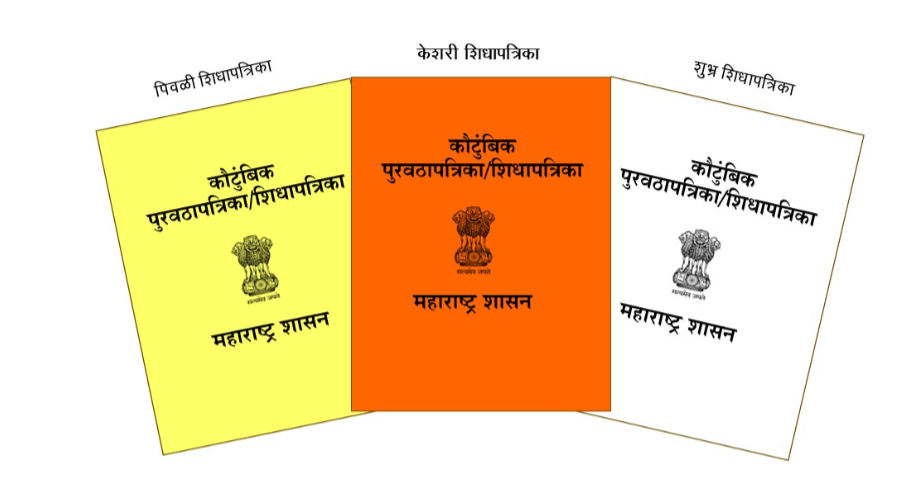
- APL Ration Card:- This ration card is given to all those people who come above the poverty line. To get an APL ration card, your annual income should be ₹ 100000 or less. This ration card is of white colour.
- BPL Ration Card:- BPL Ration Card is given to all these people who come below the poverty line. To get a BPL ration card, your annual income should be between ₹15000 to ₹100000. This ration card is of yellow colour.
- Antyodaya Ration Card:- Antyodaya Ration Card is provided to all those people who are very poor. This ration card is of saffron colour. This ration card is given to those people who do not earn.
Eligibility Criteria Maharashtra Ration Card 2026
The applicant must follow the following eligibility criteria to apply for the Maharashtra ration card:-
- Applicants should be permanent residents of Maharashtra.
- Applicants should not possess any other ration cards in the state of Maharashtra or any other state in India.
- Applicants must fall under the income criteria fixed by the government for the issue of a ration card.
Documents Required
The applicant must submit the following documents to apply for the Maharashtra Ration Card:-
- Aadhar Card
- Pan Card
- Income certificate
- Passport size photo
- Gas connection
- Mobile number
District Food Supply Officer/Food Distribution Officer
If you want to check the district Food supply officer then you will have to follow the simple procedure given below:-
- You will first have to visit the official website of the Food, Civil Supplies And Consumer Protection Department by clicking on the link given here http://mahafood.gov.in/website/english/home.aspx
- The home page will be displayed on your screen.
- You have to click on the Transparency Portal displayed on the menu bar.
- A new page with all of the other information will be displayed on your screen.
- You have to click on the option called District Food Supply Officer/Food Distribution Officer
- The details will be displayed on your screen.
Taluka Food Supply Officer
If you want to check the taluka Food supply officer then you will have to follow the simple procedure given below:-
- You will first have to visit the official website of the Food, Civil Supplies And Consumer Protection Department by clicking on the link given here http://mahafood.gov.in/website/english/home.aspx
- The home page will be displayed on your screen.
- You have to click on the Transparency Portal displayed on the menu bar.
- A new page with all of the other information will be displayed on your screen.
- You have to click on the option called Taluka Food Supply Officer
- The details regarding the officer will be displayed on your screen.
District Wise State Godown Details
If you want to check the district wise state godown details then you will have to follow the simple procedure given below:-
- You will first have to visit the official website of the Food, Civil Supplies And Consumer Protection Department by clicking on the link given here http://mahafood.gov.in/website/english/home.aspx
- The home page will be displayed on your screen.
- You have to click on the Transparency Portal displayed on the menu bar.
- A new page with all of the other information will be displayed on your screen.
- You have to click on the option called District Wise State Godown Details
- The reports will be displayed on your screen.
District Wise Fair Price Shop Details (Data under Validation)
If you want to check the district wise fair price shop then you will have to follow the simple procedure given below:-
- You will first have to visit the official website of the Food, Civil Supplies And Consumer Protection Department by clicking on the link given here http://mahafood.gov.in/website/english/home.aspx
- The home page will be displayed on your screen.
- You have to click on the Transparency Portal displayed on the menu bar.
- A new page with all of the other information will be displayed on your screen.
- You have to click on the option called District Wise Fair Price Shop Details (Data under Validation)
- The district-wise fair price shop details will be displayed on your screen.
Ration Cards Details
If you want to check the ration card details then you will have to follow the simple procedure given below:-
- You will first have to visit the official website of the Food, Civil Supplies And Consumer Protection Department by clicking on the link given here http://mahafood.gov.in/website/english/home.aspx
- The home page will be displayed on your screen.
- You have to click on the Transparency Portal displayed on the menu bar.
- A new page with all of the other information will be displayed on your screen.
- You have to click on the option called Ration Cards Details (Data under Validation)
- Click on the Ration Card option displayed on the menu bar
- A drop-down menu will be displayed on your screen.
- Click on the option called know your ration card
- Enter captcha code.
- Enter your ration card number and click on View Report to check the details.
DFSO Wise Unit Wise RC Count
If you want to check this detail then you will have to follow the simple procedure given below:-
- You will first have to visit the official website of the Food, Civil Supplies And Consumer Protection Department by clicking on the link given here http://mahafood.gov.in/website/english/home.aspx
- The home page will be displayed on your screen.
- You have to click on the Transparency Portal displayed on the menu bar.
- A new page with all of the other information will be displayed on your screen.
- You have to click on the option called Ration Cards Details (Data under Validation)
- Click on the Ration Card option displayed on the menu bar
- A drop-down menu will be displayed on your screen.
- Click on the option called DFSO Wise Unit Wise RC Count
- You have to enter the captcha code.
- Verify your captcha code and now you will have to enter the details related to your area.
- Click on View Report to check the report.
DFSO Wise Scheme Wise UID Seeding
If you want to check this detail and you will have to follow the simple procedure given below:-
- You will first have to visit the official website of the Food, Civil Supplies And Consumer Protection Department by clicking on the link given here http://mahafood.gov.in/website/english/home.aspx
- The home page will be displayed on your screen.
- You have to click on the Transparency Portal displayed on the menu bar.
- A new page with all of the other information will be displayed on your screen.
- You have to click on the option called Ration Cards Details (Data under Validation)
- Click on the Ration Card option displayed on the menu bar
- A drop-down menu will be displayed on your screen.
- Click on the option called DFSO Wise Scheme Wise UID Seeding
- You have to enter the captcha code.
- Verify your captcha code and now you will have to enter the details related to your area.
- Click on View Report to check the report.
Fair Price Shop Details
If you want to check the fair price shop details then you will have to follow the simple procedure given below:-
- You will first have to visit the official website of the Food, Civil Supplies And Consumer Protection Department by clicking on the link given here http://mahafood.gov.in/website/english/home.aspx
- The home page will be displayed on your screen.
- You have to click on the Transparency Portal displayed on the menu bar.
- A new page with all of the other information will be displayed on your screen.
- You have to click on the option called Ration Cards Details (Data under Validation)
- Click on the Ration Card option displayed on the menu bar
- A drop-down menu will be displayed on your screen.
- Click on the option called Fair Price Shop Details
- You have to enter the captcha code.
- Enter your details related to your area and click on View Report to check the report.
FPS Wise Online Allocation
If you want to check the FPS wise online allocation then you will have to follow the simple procedure given below:-
- You will first have to visit the official website of the Food, Civil Supplies And Consumer Protection Department by clicking on the link given here http://mahafood.gov.in/website/english/home.aspx
- The home page will be displayed on your screen.
- You have to click on the Transparency Portal displayed on the menu bar.
- A new page with all of the other information will be displayed on your screen.
- You have to click on the option called FPS Wise Online Allocation
- The details will be displayed on your screen.
Taluka Wise Online Allocation
If you want to check the taluka wise online allocation then you will have to follow the simple procedure given below:-
- You will first have to visit the official website of the Food, Civil Supplies And Consumer Protection Department by clicking on the link given here http://mahafood.gov.in/website/english/home.aspx
- The home page will be displayed on your screen.
- You have to click on the Transparency Portal displayed on the menu bar.
- A new page with all of the other information will be displayed on your screen.
- You have to click on the option called Taluka Wise Online Allocation
- The details will be displayed on your screen.
Allocation Generation Status
If you want to check the allocation generation status then you will have to follow the simple procedure given below:-
- You will first have to visit the official website of the Food, Civil Supplies And Consumer Protection Department by clicking on the link given here http://mahafood.gov.in/website/english/home.aspx
- The home page will be displayed on your screen.
- You have to click on the Transparency Portal displayed on the menu bar.
- A new page with all of the other information will be displayed on your screen.
- You have to click on the option called Allocation Generation Status
- A new page will be displayed on your screen where you will have to enter specific information and the status will be displayed on your screen.
Automated FPS
If you want to check the automated FPS details then you will have to follow the simple procedure given below:-
- You will first have to visit the official website of the Food, Civil Supplies And Consumer Protection Department by clicking on the link given here http://mahafood.gov.in/website/english/home.aspx
- The home page will be displayed on your screen.
- You have to click on the Transparency Portal displayed on the menu bar.
- A new page with all of the other information will be displayed on your screen.
- You have to click on the option called Automated FPS
- The details will be displayed on your screen.
Contact Details
If you want to contact the concerned authorities then you will have to follow the simple procedure given below:-
- You will first have to visit the official website of the Food, Civil Supplies And Consumer Protection Department by clicking on the link given here http://mahafood.gov.in/website/english/home.aspx
- The home page will be displayed on your screen.
- You have to click on the Contacts displayed on the menu bar.
- The contact information will be displayed on your screen.
File Complaint
If you want to file a complaint then you will have to follow the simple procedure given below:-
- You will first have to visit the official website of the Food, Civil Supplies And Consumer Protection Department by clicking on the link given here http://mahafood.gov.in/website/english/home.aspx
- The home page will be displayed on your screen.
- You have to click on the Online Grievance Redressal System option displayed under the Online Services menu present on the home page.
- A new page will be displayed on your screen where you will have to click on the option called Report It
- The complaint application form will be displayed on your screen where you will have to enter the details regarding your personal information and the complaint.
- You have to submit the report and keep the ID safe and secure to carry on various procedures.
Check Complaint Status
If you want to check the complaint status then you will have to follow the simple procedure given below:-
- You will first have to visit the official website of the Food, Civil Supplies And Consumer Protection Department by clicking on the link given here http://mahafood.gov.in/website/english/home.aspx
- The home page will be displayed on your screen.
- You have to click on the Online Grievance Redressal System option displayed under the Online Services menu present on the home page.
- A new page will be displayed on your screen where you will have to click on the option called Check the status of your complaint
- Enter your complaint number and mobile number
- Click on Submit to check the status
Important Documents for Maharashtra Ration Card 2026
Given below are the direct links to download the important documents to apply for the ration card in the Maharashtra state:-
Application for New FPS
- Procedure
- Application form for MTRA
- Application form for Rest of Maharashtra
- Checklist for Application Form
Application for Renewal of FPS
- Procedure
- FPS Renewal form for MTRA
- FPS Renewal form for Rest of Maharashtra
- Checklist for Renewal of FPS
Final FPS Certificate Format
RCMS
FEAST-Online Allocation & Supply Chain
Cashless FPS
Helpline Numbers for Maharashtra Ration Card 2026
- Toll Free Number- 1800224950 & 1967
- Email Id- helpdesk.mhpds@gov.in